

Diagnostic Software for VW-Audi Group Cars
- Home
- Products
- VCDS
- Support
- Car Info & Procedures
- Applications
Vehicle Application Charts
Updated 8 Jul. 2011
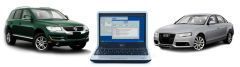
Locate your model below and click on the link. Inside you'll find information about the different computers (control modules) in the vehicle as well as a list of which VAG-COM Interface you should buy to work with that car. These pages are transitioning to the Ross-Tech Wiki so you may be transported to a different website.
| Volkswagen |
Audi |
|
VW Golf / GTI / Jetta / Bora / Vento / Rabbit(wiki) VW Cabrio(wiki) VW New Beetle(wiki) VW Passat(wiki) VW Touareg (wiki) VW Phaeton (wiki) VW Transporter / Eurovan / Winnebago Rialta (wiki) VW Corrado(wiki) VW Eos (wiki) VW Tiguan (wiki) |
Audi TT(wiki) Audi A3/S3 (wiki) Audi A4 / A4 Cabriolet / S4 / RS4(wiki) Audi A5 / S5(wiki) Audi A6 / 100 / A6 / Allroad / S6 / Ur-S4 / RS6(wiki) Audi 200 / V8 / A8 / S8(wiki) Audi 90 / Cabriolet(wiki) Audi Q5(wiki) Audi Q7(wiki) Audi R8 (wiki) |
Note: These charts show the control modules in each vehicle offered for sale in the US, as far as we know. The "VW" Routan is actually a rebadged Dodge Caravan and is NOT supported by either VCDS or by the factory VW scan tools. There are vehicles and configurations not listed, specifically models only available outside the US. Please send any corrections or additions to: Support@Ross-Tech.com
Check out the
Ross-Tech Wiki for
more information including modules in vehicles sold outside the US.
This PDF document contains additional info on rest-of-World models:
VCDS Compatibility Charts
Unless otherwise noted, all content on this site is Copyright (c) 2000-2021 by Ross-Tech LLC. All rights reserved.
"VCDS", "VCDS-Mobile" and "HEX-NET" are Registered Trademarks of Ross-Tech, LLC.
Ross-Tech is not affiliated with the Volkswagen Group in any way.